Taskbar & menu bar
On Windows a compact panel sits inside the taskbar with the next prayer and a live countdown. On macOS the mosque icon sits in the menu bar; the countdown is one click away, with the whole day’s schedule underneath.
Windows & macOS · Free
Prayer times that live in your taskbar — or, on a Mac, in your menu bar. A quiet countdown to the next prayer, the adhan you choose, and a full-screen screensaver when the machine is idle — calculated for any city on earth.
On a Mac — paste this into Terminal:
curl -fsSL https://mejelsoft.com/mac | bash
It picks the right build for your Mac, installs it, signs it on your machine and launches it. Nothing to unzip, nothing to drag. Prefer the files? Apple silicon zip · Intel zip.
On Windows a compact panel sits inside the taskbar with the next prayer and a live countdown. On macOS the mosque icon sits in the menu bar; the countdown is one click away, with the whole day’s schedule underneath.
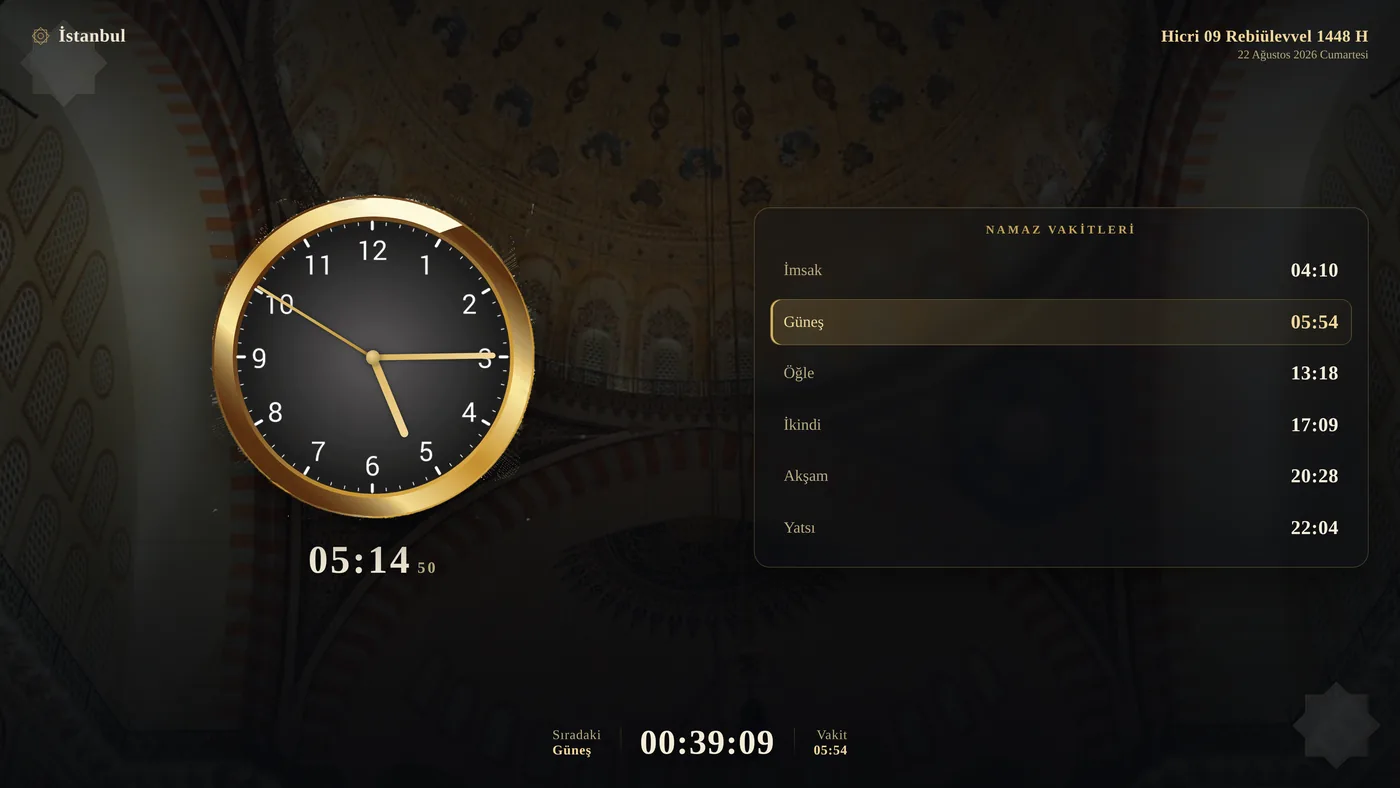
Click the tray icon for a golden analog clock, the full daily schedule, the countdown and one-click access to settings.
Download a ready recitation from inside the app, or drop your own MP3 into the folder for each prayer — dawn, noon, afternoon, sunset, night. Your own files are never overwritten.
Short beeps at 45, 30 and 15 minutes before the current prayer window closes, so a prayer is never missed by accident. Can be switched off.
Over 34,000 cities in 244 countries, searchable and accent-insensitive, stored inside the app. Each city carries its own time zone, so times stay correct even when the city differs from the computer's clock.
After an idle period the screen fills with an analog clock and the day's schedule — or with your own images, shown full-frame with the time on a discreet bar.
A whole month of times is fetched at once and cached locally, so the app keeps working without a connection and does not hit the network on every launch.
New versions download and install themselves in the background from our own release feed. No store, no prompts, no restart nagging.
curl -fsSL https://mejelsoft.com/mac | bash
It detects whether your Mac is Apple silicon or Intel, downloads that build, installs it to
/Applications, clears the download quarantine flag and signs it on
your machine — the app is not notarised by Apple, and Apple silicon refuses to launch
anything unsigned. Then it opens. Run the same line again any time to reinstall.Rather not pipe a script? Download the Apple silicon or Intel zip, unpack it and run ./install-mac.sh inside — same steps, done by hand.
There is no sign-up, no analytics, no telemetry and no advertising. Nothing you do in the app is reported anywhere.
Prayer times come from the public aladhan.com API — it receives only coordinates and a date. If you ask the app to find your location, an approximate lookup may be made through ip-api.com. Update checks and optional image packs are fetched from mejelsoft.com.
Settings, cached prayer times, your adhan audio and screensaver images live in %APPDATA%\EzanVakti on Windows and ~/Library/Application Support/EzanVakti on macOS — never uploaded.
Windows Location Services are used only if you press the locate button and grant permission. The Mac build never touches Core Location — it offers an approximate IP lookup instead. You can always pick a city by hand.
Full studio policy: Privacy Policy.
Menu bar shows the mosque icon alone — the countdown moved into the menu. Screensaver now covers the whole screen, above the menu bar and the Dock.
Silent automatic updates: checked every six hours, verified by checksum, applied while you are away from the keyboard.
First Mac release. Menu bar app with the same prayer engine, worldwide city database, adhan playback, image packs and screensaver as the Windows version.
Screensaver now works on every PC: a native fallback view when the WebView2 component is missing, and automatic recovery from a locked WebView2 data folder.
Fixed a black screensaver on large image collections, and the window now closes itself if the renderer ever fails.
Ready-made adhan pack downloadable from inside the app, installed only into prayer folders you left empty.
Home screen on tray click — analog clock, daily schedule and quick actions. Screensaver now shows your own images full-frame instead of behind the clock.
Worldwide city database (34,000+ cities) with search and per-city time zones. Screensaver slide duration and shuffle settings.
In-app image pack downloader for the screensaver, with resumable downloads and verification.
Beep reminders at 45, 30 and 15 minutes before the prayer window closes.
Proper installer and silent automatic updates.
Questions, bug reports or a feature you miss:
mejelsoft@gmail.comcurl -fsSL https://mejelsoft.com/mac | bash — and it picks the right build and installs it. Windows uses a standard setup installer.